You Can't Make Your Company AI Native Without Dealing With This First

Ok, let's say you working in the company and your management or you the manager all day long talking about being AI native. First of all what does it mean to become an AI native company? Fire all developers and build AI agents to make all work? Maybe. Or something less radical, like add AI in all steps of product lifecycle? Might be.
Regardless how radical you want to be, probably you will miss the most important point, without it all your idea of becoming an AI native company will fail. Moreover you might damage your company badly.
Let's go over a basic product life cycle (I believe it will cover up to 80% of tech companies out there).
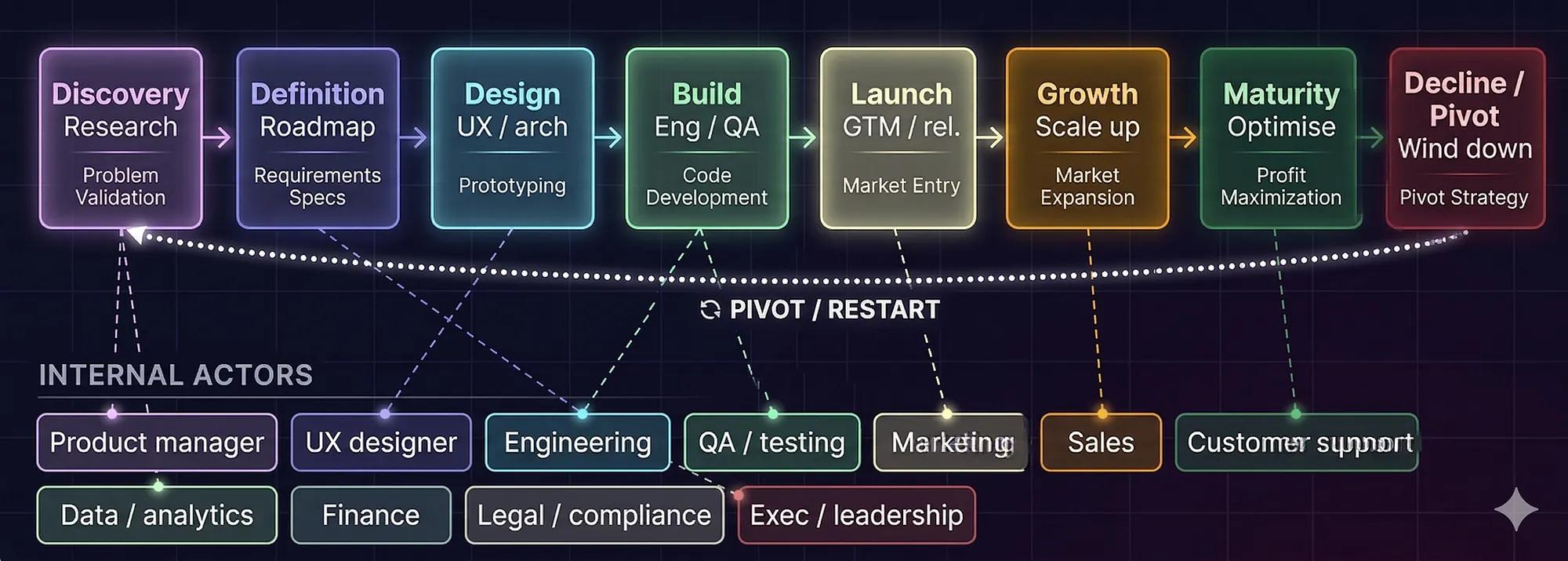
Let's define Actors:
- Product Manager — comes up with ideas for new features, owns the roadmap, and makes prioritisation calls across the entire lifecycle
- Product Analyst — tells which features are in use, identifies patterns in user behaviour, and suggests new features or improvements to Product
- UX Designer — translates product ideas into wireframes, prototypes and user flows; ensures the experience is usable before a line of code is written
- Architect — defines the technical foundation; makes system design decisions at definition and design phases to ensure the product can scale, integrate, and be maintained long-term
- Engineering — builds the product; turns specs and designs into working software, raises technical constraints early
- QA / Testing — validates that what Engineering built matches what was defined; catches regressions and edge cases before release
- Marketing — shapes how the product is positioned and communicated to the market; drives awareness at launch and ongoing growth
- Sales — converts market interest into revenue; feeds back real customer objections and needs into the roadmap
- Customer Support — first line of contact after launch; surfaces recurring pain points and bugs that inform future iterations
- Data / Analytics — measures everything post-launch; tells the business what is working, what is not, and where to invest next
- Finance — validates the business case, tracks ROI, and gates investment decisions at key lifecycle milestones
- Legal / Compliance — ensures the product meets regulatory requirements; involved at definition and before any major release
- Exec / Leadership — sets strategic direction, allocates resources, and makes go/no-go calls at critical lifecycle gates
Ok. Up until now nothing new… let's add something that connects all of them… can you guess what is this? Yeah, money.. But I'm talking about something else — knowledge. How do all those actors share information? Meetings, emails, chats? Let's have another look at knowledge storages of different types.
Where does all the knowledge live? (Spoiler: everywhere and nowhere)
Let's talk about something nobody warns you about when you join a product team. Every actor in the product lifecycle has their own favourite place to store knowledge. And surprise — none of them talk to each other by default.
You end up with a beautiful mess. The product manager has the grand vision locked in Confluence. The analyst has the real data somewhere in a Notion doc nobody can find. The architect drew the perfect diagram in Miro at 11pm and never shared the link. Developers have the actual truth buried in Jira tickets and Git commits. And the customer? They screamed into the Zendesk void and nobody connected that feedback to anything.
Here's how it actually breaks down by actor.
Product Manager lives in Confluence, Notion, or ProductBoard. This is where the PRDs, roadmaps, and meeting notes go to slowly become outdated. ProductBoard is for collecting ideas and prioritising features — basically a graveyard of great ideas that "aren't in scope this quarter."
Product Analyst lives in Mixpanel, Amplitude, Looker, or Google Analytics. They know which features nobody uses. They just need someone to actually read their reports.
UX Designer works in Figma and documents things in Confluence or Notion. Figma is where the real truth lives — the design system, the flows, the components. Confluence is where they paste screenshots of Figma that are already outdated.
Architect owns Miro, Lucidchart, or draw.io for diagrams, and drops the technical specs into Confluence. The architecture doc is usually either 3 years old or written last week in a panic before a review.
Engineering lives in Jira (tickets), GitHub/GitLab (code and PRs), and Confluence (technical docs nobody updates). The real knowledge is in the code and in developers' heads. That's the scary part.
QA / Testing tracks everything in Jira, TestRail, or Zephyr. Bug reports, test cases, regression results. It's detailed, organised, and the last place a product manager will ever look.
Marketing keeps their stuff in HubSpot, Notion, or shared Google Docs. Campaign briefs, messaging guidelines, competitor research — living in folders with names like "Final_v3_ACTUAL_final."
Sales runs on Salesforce or HubSpot CRM. Call notes, deals, customer objections, win/loss reasons. Probably the richest source of real-world product feedback. Also probably the least connected to the product team.
Customer Support works in Zendesk, Intercom, or Freshdesk. Every complaint, every workaround, every "this is broken" message from real users is sitting there. Waiting. Mostly ignored by product until something breaks badly enough.
Data / Analytics stores everything in Snowflake, BigQuery, dbt, and visualises in Tableau, Looker, or Metabase. They have answers to questions nobody has asked yet.
Finance runs on Excel. Always. Maybe SAP or NetSuite if the company is grown up. Budget models, ROI forecasts, headcount plans — in spreadsheets with 47 tabs.
Legal / Compliance uses SharePoint, internal wikis, or just… email threads. Contracts, compliance docs, policy guidelines live here. Usually in a folder structure designed in 2014.
Exec / Leadership consumes knowledge through dashboards (Tableau, Looker), slide decks (PowerPoint, Google Slides), and Slack. They don't go looking for knowledge — knowledge needs to come to them, formatted nicely, in under 5 slides.
Customers leave their knowledge in Zendesk tickets, App Store reviews, Typeform surveys, NPS responses, and UserVoice requests. This is the most honest knowledge in the whole organisation. It also has the longest journey to actually influence anything.
The brutal reality is this: 36% of organisations use three or more knowledge management tools, and 31% aren't even sure how many tools they have in place. Most knowledge doesn't flow — it pools. Each team builds their own lake, and crossing between them requires either a very motivated person or a very painful incident.
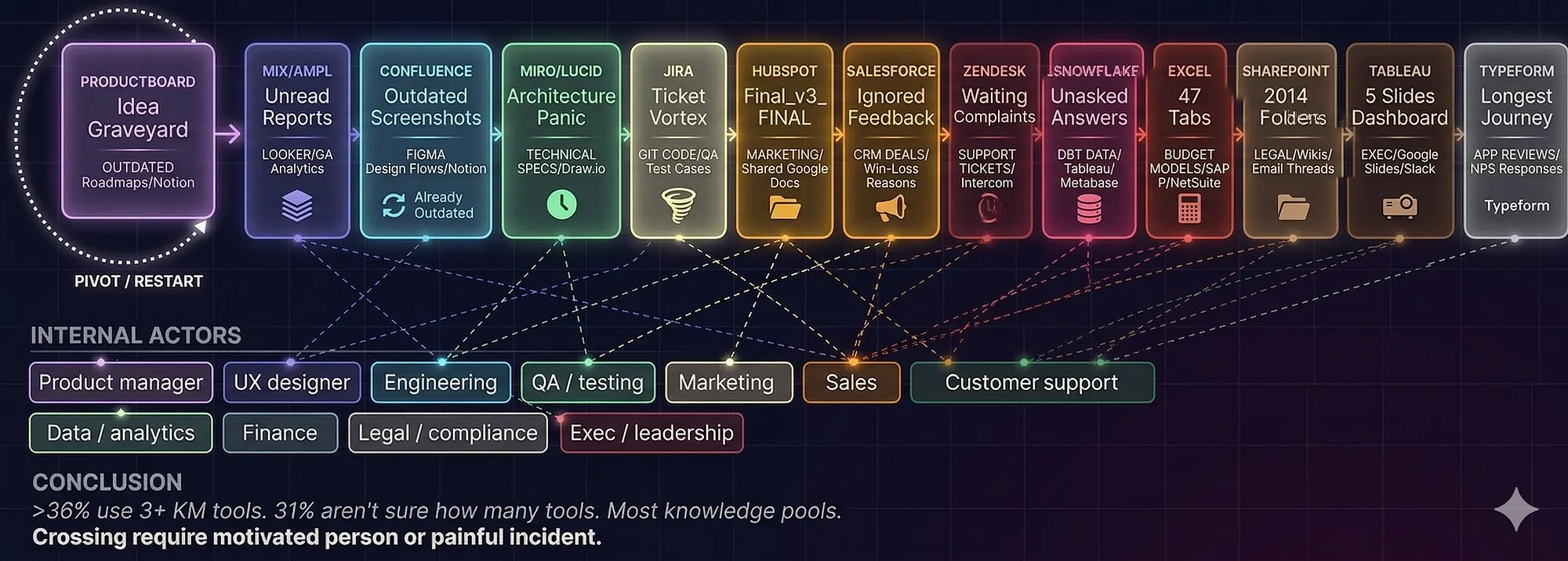
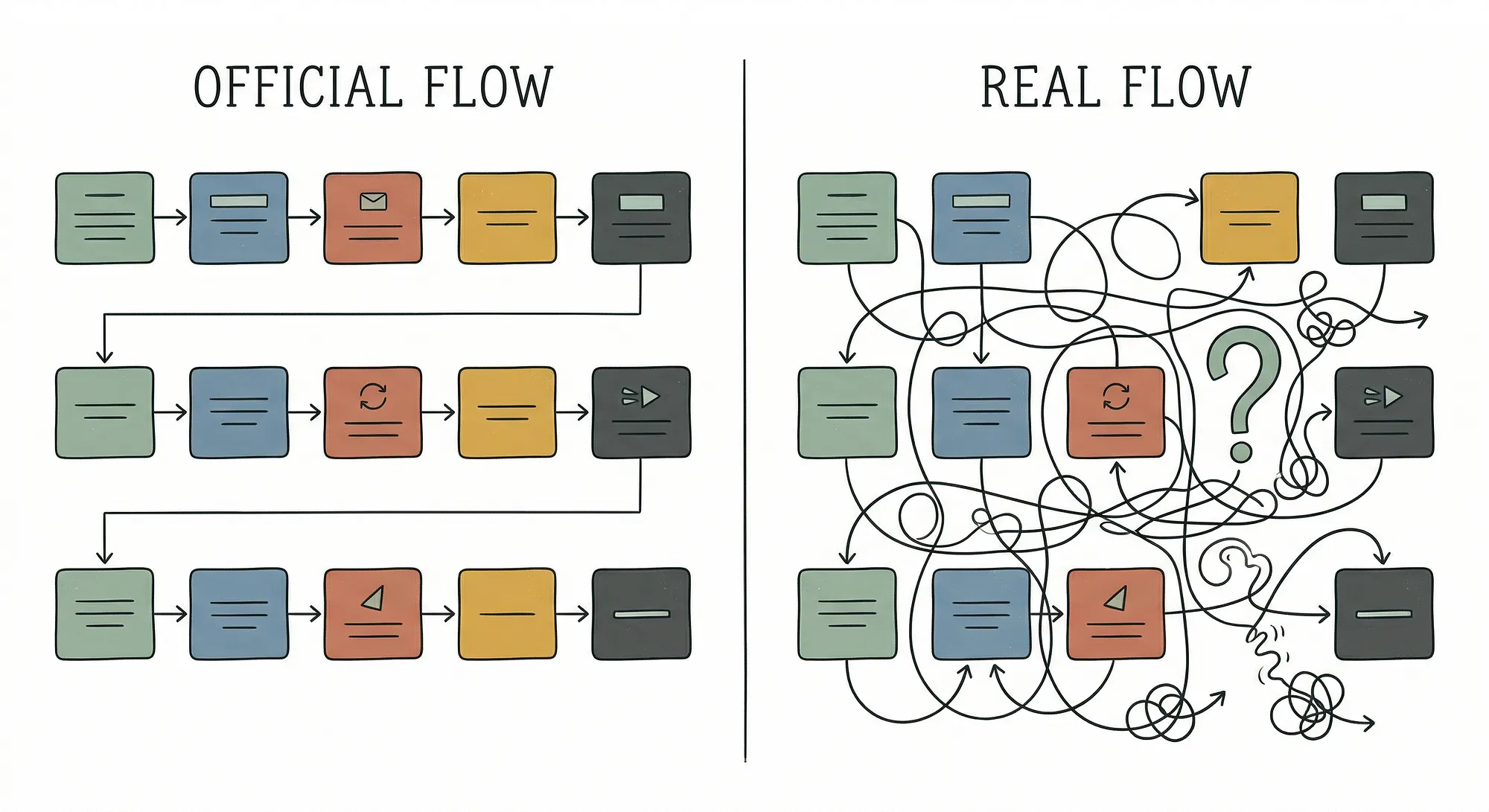
And here's the uncomfortable truth that the diagram politely hides: most of these tools don't talk to each other. The product manager writes a PRD in Confluence. The engineer closes the Jira ticket. The sales rep logs the customer objection in Salesforce. The analyst sees the drop in Amplitude. And nobody connects those four dots — because there is no system that does it automatically. Someone has to care enough to do it manually. That someone is usually called "the one person who actually reads everything," and they're always slightly burned out.
The tools are fine. The connections between them — that's where knowledge goes to die.
Ok, and now let's talk about being AI native…
Section 3 — So you want AI to help. Let's see what it's actually working with.
Here is where it gets interesting. And by interesting I mean a little painful.
Let's take a developer. Modern, senior, not afraid of AI tools. He opens Cursor or uses Claude Code, connects MCP to Jira, pulls the ticket, connects MCP to GitHub, creates the PR. Doesn't even open IDE. Impressive, right? He's telling everyone in the Slack channel he's fully AI native now.
But wait. What happens when the ticket says "implement feature BBB according to the architecture"? AI goes to find the architecture. Where is it? In Miro. Does Cursor have MCP for Miro? Maybe. Does the diagram have enough context written in it or it's just boxes and arrows that only the architect who drew it at midnight understands? Almost certainly the second option.
So the developer copies the diagram, pastes it into Claude. Then remembers there's an HLD somewhere in Confluence. Finds it. It's from 2022. Pastes it anyway. Then the product requirement mentions a shared library. Developer goes to find the README. It's three lines long and the last commit was 14 months ago. Pastes it too.
Now Claude has a context window full of contradictory, outdated, and half-finished information. And here's the thing — even if you have a model with a million token context window, more tokens doesn't mean better results. Research measured 18 different LLMs and found that "models do not use their context uniformly — performance grows increasingly unreliable as input length grows." Basically you're not giving AI more knowledge, you're giving it more noise to get lost in.
There's even a name for this now. Context rot. When an agent lacks good institutional knowledge, it enters a vicious cycle — guess, fail, get corrected, retry. Each iteration fills the context window with more garbage and degrades reasoning further. The DORA 2025 report documented this across the industry: despite 90% AI tool adoption, there was no clear link between adoption and reduction in developer friction or burnout. Developers went faster individually but teams didn't deliver faster.
And that's the developer case. A relatively structured job with tickets and PRs and code.
Now let's look at the architect. An architect needs to design a system for feature BBB. To do this properly, he needs to know: what systems already exist, what their limitations are, what shared libraries are available, what the compliance requirements are, what similar decisions were made before and why, what the team owning Service X can actually support, and what the data model looks like today versus what the PRD assumes. That's at least six different sources of truth. Some of them are in Confluence. Some are in someone's head. Some of the Confluence pages are outdated. Some of the heads have left the company.
Can AI help here? Absolutely. But only if all this information is actually accessible, structured, and trustworthy. If you ask AI to design an architecture based on garbage inputs, you get a beautiful, well-written, completely wrong architecture. And then engineers build it. And then you spend six months wondering why it doesn't work.
So no. Just having AI tools is not being AI native. You're just spending more on tokens while doing the same amount of manual context management as before.
Section 4 — Half the problem: cleaning what you already have

Here's the uncomfortable reality. Before you can think about making AI work with your knowledge, you need to deal with the knowledge you already have. And most of it is, let's be honest, a mess.
I've worked in more than 15 companies over 25 years. Startups, enterprises, everything in between. The one constant is that everyone has a knowledge management problem. Everyone knows it. Everyone has tried to fix it at least twice. And somehow there are always five tools running in parallel, three Confluence spaces nobody maintains, and a Wiki page titled "Current Architecture" that describes a system that was replaced in 2021.
So before you index anything into your shiny new knowledge graph, you need to sort what's actually worth indexing. Here's how I think about it.
Production code = ground truth. If a service is running in production right now, that's reality. That's a 100 trust score. Whatever documentation says about it doesn't matter — the code is what it is. If the docs say the service uses PostgreSQL and the code says MongoDB, the code wins. Always.
Closed tickets (epics and stories) = high trust. A ticket that went through definition, development, review, and was marked done — that's a record of something that actually happened. Not bugs, not subtasks, those are too granular and noisy. But a properly closed epic or story is a meaningful, trustworthy unit of organizational knowledge.
Passing test plans = medium trust. Tests that run regularly and consistently pass reflect how the system actually behaves. Tests that are skipped, failing, or haven't run in months? Those tell you something too — but not what the system does. They tell you what someone hoped the system would do at some point.
Wiki and Confluence pages = verify before trusting. This is where it gets messy. A wiki page has no inherent trust signal. It might have been written yesterday by a senior engineer who just redesigned the whole system. Or it might have been written in 2019 by an intern who left a week later. You can't tell from the content alone.
How do you filter? A few signals help. When was it last edited, and by whom? Does it reference services or features that still exist? Are there links in it that still work? Does the code referenced in it actually match what's in the repo? These aren't perfect filters but they're good enough to categorize a page as probably current, probably stale, or definitely dead.
Here's a practical heuristic: if a Confluence page hasn't been touched in 18 months and describes something that should change more often than that — like an API contract, a deployment process, or a data model — treat it as stale by default. Require a human to verify before it gets indexed.
Figma files = almost unindexable without effort. Most Figma links in PRDs or epics have no description next to them. Just a URL. So you have a link that points to a specific frame, in a file that may have been renamed, in a team that may have reorganized. And even if you can access the content, how do you know which version is current? Design files have histories, branches, drafts. Without explicit ownership and a "this is the approved version" marker, Figma is just expensive noise in your knowledge graph.
The only way Figma becomes trustworthy knowledge is if teams adopt a discipline: final, approved designs get exported as described components into a system that can be indexed. Not a raw Figma link. A summary, a component name, a version. It's more work. But without it, you're indexing "someone drew something" and that's not knowledge.
README files in shared libraries = depends. If the library has active users, recent commits, and the README was updated in the last release — good signal. If it's a shared library from 2018 that "everyone uses" but nobody touches — that README is documentation for a black box, not for a living system. Treat accordingly.
The hard truth about filtering. You can't fully automate this. You can score content automatically based on age, link health, git activity correlation, and deployment records. But the final call on "is this still true" often requires a human who understands what this piece of the system actually does today. The good news is you only have to do the full audit once. After that, if you build good processes for new knowledge (more on this below), you don't let the mess accumulate again.
The goal of this whole exercise is not to have a perfect knowledge base. That doesn't exist. The goal is to have a knowledge base where AI can say with reasonable confidence "this is probably accurate" versus "this might be outdated, treat with caution." That distinction matters enormously when AI is making architectural recommendations or writing code.
Section 5 — The other half: building new knowledge correctly
Cleaning the old stuff is hard. Building new knowledge correctly from the start is, surprisingly, harder. Because it requires people to change behavior. And people don't love changing behavior.
Let's follow feature BBB through its lifecycle and ask the simple question: when does something become true?
The product manager writes a PRD. Is that truth? No. It's an intention. A hypothesis. It might change three times before anyone writes a line of code. Indexing it as ground truth at this stage would pollute your knowledge graph with wishes.
The PRD gets approved. Is it truth now? Getting warmer. It's a committed intention. But the implementation might still diverge. Things get discovered. APIs turn out to have different limitations than expected. The design gets revised. The scope gets cut.
The feature gets built and deployed to staging. Is the HLD truth now? Partially. The high-level design reflects something real but the details are still in flux. API contracts might still be changing. Edge cases are being discovered.
The feature goes to production. Now we're talking. The code is truth. The closed epic is truth. The passing tests are truth. The architecture as-implemented is truth — not the HLD as written, but the HLD corrected by whatever actually got built.
So the right answer to "when should we index this" is not a single moment. It's a staged process:
- PRD approved → index as intention with low trust score, tagged "in progress"
- Development starts → HLD and architecture docs indexed as design, medium trust, mutable
- Feature released to production → all related knowledge promoted to verified, high trust, code becomes the arbiter of any conflicts
- Six months in production with no major issues → treated as stable knowledge, used confidently in future architecture decisions
This sounds obvious when you write it down. But almost no company does it. They either index everything all the time (chaos) or nothing (ignorance). The middle path — staged trust elevation — is what actually works.
The other critical part of building new knowledge is making it someone's responsibility. Not "everyone's responsibility." Everyone's responsibility is nobody's responsibility. You need someone — a role, a ritual, a checkpoint — that ensures knowledge gets captured correctly at each lifecycle gate.
In practice this looks like: no epic closes unless the ADR is written. No architecture review sign-off unless the HLD is updated to reflect what was actually decided. No production release unless the README of any affected library is updated. These aren't bureaucratic checkboxes. They're the price of admission for AI native operations. If you skip them, you're back to copy-pasting context by hand.
Section 6 — The temp memory idea, and why it's actually the most interesting part
Ok so here's the idea I've been thinking about and I haven't seen anyone describe it quite this way.
What if a feature had its own memory?
Not a document. Not a Jira epic. A living, append-only knowledge context that follows feature BBB from the moment it's conceived to the moment it ships — and then gets promoted into the permanent knowledge graph.
Think of it like a construction site. When you're building, you have temporary scaffolding, work-in-progress materials, partially completed structures. You don't put scaffolding in the building's official blueprints. But the scaffolding is real and necessary while you're building. When construction is done, you take down the scaffolding, document the actual building, and file the final blueprints.
Feature memory works the same way. From day one of feature BBB, there's a dedicated knowledge container. Every relevant artifact gets appended to it:
- PRD created → appended
- Architecture diagrams → appended with links and versions
- ADR written → appended
- API contract defined → appended
- Compliance check done → appended with outcome
- Test plan created → appended
- PRD updated (version 2) → appended, old version marked superseded
- API contract changed during development → appended, old version marked superseded
The key word is appended. Nothing gets deleted. Everything gets timestamped. The memory always knows what was true when, and what superseded what. This is temporal knowledge — not just "what is the API contract" but "what was the API contract on March 15th when we made this architectural decision."
There's actually a real framework that works exactly like this. Graphiti, built by Zep AI, implements temporally-aware knowledge graphs where facts have validity windows. When something changes, old facts are invalidated — not deleted — and the new fact takes over. You can query what's true now, or what was true at any point in time. That's exactly what feature memory needs.
When feature BBB ships to production, the temp memory doesn't disappear. It gets promoted. A summarization pass runs — probably AI-assisted — that distills the key decisions, the final architecture, the API contracts as-implemented, and the lessons learned. This summary goes into the main knowledge graph as a verified, high-trust node. The full history stays accessible if you need to trace why a decision was made, but the promoted summary is what future architects and developers query.
Now the sync question. This is the hard part and I'm not going to pretend it's solved.
If the PRD lives in Confluence and the product manager updates it, how does the feature memory know? If the Figma design gets revised, how does the memory update? If a developer changes an API contract in code, how does that propagate back?
There are a few approaches and none of them is perfect:
Webhook-based sync. Every time a relevant document changes in Confluence, Jira, GitHub, Figma — a webhook fires, the change gets appended to the feature memory. Works in theory. Requires every tool to support webhooks (most do), requires someone to set up the integrations, and requires good document-to-feature tagging so the webhook knows which feature memory to update.
Scheduled polling with change detection. A background process checks for changes in linked documents every few hours. Less real-time but simpler to implement. Good enough for documents that don't change frequently, like architecture docs.
Human checkpoints. At each lifecycle gate (PRD approval, architecture review, staging release, production release), a checklist requires the relevant actor to confirm "all changes are reflected in the feature memory." Manual, but forces accountability.
AI-assisted monitoring. An AI agent watches for semantic changes in source documents and flags them. "The API contract in Confluence now differs from what's indexed in feature BBB memory — please review." This is the most interesting option and it's technically feasible today with the right tooling. It's also the one nobody has fully shipped in a production company context yet.
My honest take: start with webhooks plus human checkpoints at gates. Don't try to automate everything on day one. The discipline of "before we close this epic, let's verify feature memory is current" is more valuable than perfect automation that nobody trusts.
Section 7 — So what does AI native actually look like?
Let's close with the question we started with. What does it actually mean to be AI native?
It's not using Cursor. It's not having Claude write your PRDs. It's not building agents for every department. Those are tools. Tools don't make you AI native.
AI native means your knowledge is structured, trusted, and accessible — to AI — at every step of your product lifecycle. Without a human manually bridging the gap.

Here's what that actually looks like in practice:
When a product manager starts working on feature BBB, they spin up a feature knowledge context. Every artifact they create — research, competitive analysis, PRD — gets indexed immediately, tagged, and linked to relevant existing knowledge in the graph. AI helps them at this stage by surfacing related past features, relevant compliance constraints, and similar architectural decisions the company has made before. Not because someone briefed the AI. Because the knowledge is there.
When the architect starts the HLD, they don't start from a blank page. They query the knowledge graph for the current state of the affected systems, the relevant ADRs, the shared libraries, the team boundaries. AI generates a first-draft HLD that's actually grounded in reality. The architect's job is to review, correct, and approve — not to gather information manually for three days.
When the developer picks up a ticket, their AI agent already has the full feature context. PRD, HLD, API contracts, relevant test cases, coding conventions for this codebase. The developer describes what they want to build. The agent builds it with full awareness of how it fits into the system. No copy-pasting. No "let me find that Confluence page."
When QA runs tests, the results feed back into the feature memory automatically. Failing tests are flagged. The feature memory now contains not just what was intended but what was verified.
When the feature ships to production, the knowledge graph gets updated. The promoted summary is there for the next person who needs to build something on top of this. The architectural decisions are recorded. The trade-offs are documented. The lessons learned are captured.
And six months later, when a new developer joins the team and asks "how does feature BBB work and why was it built this way" — the answer exists. Not in someone's head. In the graph.
That's AI native.
Is this utopia? A little bit. But here's the thing — none of this requires technology that doesn't exist. GraphRAG is real. Temporal knowledge graphs are real. Webhook integrations are real. The technology is ready. What's missing in most companies is the discipline, the process design, and the cultural understanding that knowledge management is not a nice-to-have. It's the foundation everything else is built on.
You can spend a million dollars on AI tools. You can give every developer a Cursor subscription and every product manager a Claude account. And if your knowledge is siloed, outdated, and inaccessible to AI — you'll get faster individual contributors who still work in an organisationally slow company. You'll have AI-assisted outputs built on garbage inputs.
The companies that figure this out first — the ones that treat their knowledge graph as a first-class engineering concern, that build discipline around it, that make it the connective tissue between every actor and every lifecycle stage — those are the ones that will actually benefit from AI at scale.
Everyone else is just buying expensive autocomplete.